
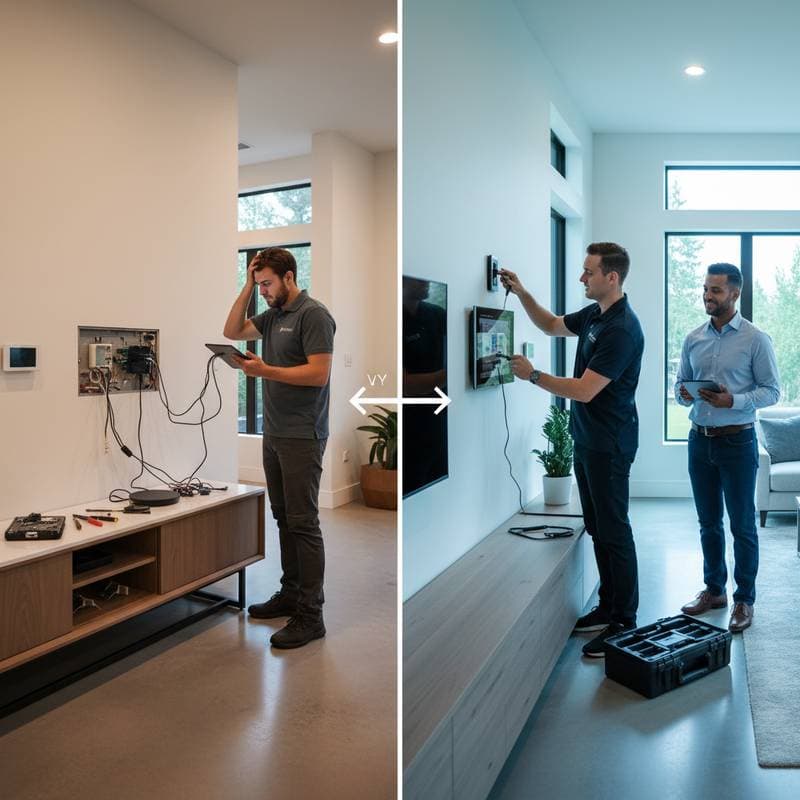
Introduction to DIY Smart Homes and Professional Boundaries
Smart home technology transforms everyday living by integrating devices for lighting, security, climate control, and more. Homeowners often start with do-it-yourself approaches to save money and gain hands-on experience. However, projects vary in scope, and recognizing limitations proves essential for success.
Certain installations involve intricate wiring, network optimization, or safety protocols that exceed typical DIY skills. Professionals bring specialized tools, certifications, and foresight to prevent errors that could lead to system failures or hazards. This guide outlines scenarios where expert help delivers superior results, balancing enthusiasm for self-installation with the assurance of professional oversight.
Key Indicators for Hiring Professionals
Deciding between DIY and professional services hinges on project scale, technical demands, and potential risks. Simple additions, such as a single smart plug or voice-activated speaker, suit beginner efforts. Larger systems, however, benefit from expert involvement to ensure integration and durability.
Consider factors like electrical modifications, multi-device synchronization, and compliance with building codes. For instance, installing smart locks on exterior doors requires secure mounting and tamper-resistant features, areas where professionals excel. Early assessment of these elements avoids rework and enhances overall system performance.
Cost analysis also informs the choice. While DIY reduces labor fees, professional services often include warranties and efficiency gains that offset initial expenses over time. Evaluate your comfort with technology and time availability to make an informed decision.
Professional Installation Timelines and Benefits
Hiring certified installers accelerates setup and minimizes disruptions. Timelines depend on project complexity, home size, and existing infrastructure. Below are examples of standard durations for common smart home upgrades.
- Whole-home lighting automation: 1 to 2 days, including wiring recessed fixtures and programming scene-based controls.
- Smart HVAC system integration: 3 to 4 hours, focusing on thermostat calibration and zone-specific adjustments.
- Complete security ecosystem with sensors, cameras, and central hubs: 1 full day, encompassing placement optimization and integration testing.
Beyond speed, professionals configure advanced automations, such as geofencing for automatic adjustments when you arrive home. They test connectivity across devices, ensuring reliable app control from smartphones or voice assistants. This comprehensive approach integrates diverse brands into a unified network, reducing future compatibility issues.
Professionals also address hidden challenges, like signal interference from thick walls or outdated electrical panels. Their expertise ensures systems operate at peak efficiency, often incorporating energy-saving features that lower utility bills. In contrast, DIY attempts may overlook these nuances, leading to suboptimal performance.
Troubleshooting Common DIY Challenges
DIY enthusiasts frequently encounter hurdles that test patience and technical knowledge. Proactive awareness of these issues equips you to either resolve them independently or pivot to professional aid. The following sections detail prevalent problems and solutions.
Connectivity Failures
Reliable Wi-Fi forms the backbone of smart home operations. Homes with multiple floors or dense construction often suffer from signal dead zones, causing devices to disconnect intermittently. Begin by conducting a signal strength audit using free apps to identify weak areas.
Install mesh Wi-Fi systems or signal extenders to broaden coverage. Position routers centrally and away from metal objects or microwaves that disrupt frequencies. If problems persist, professionals employ diagnostic tools to map network paths and recommend custom solutions, such as wired backhaul for stability.
Persistent failures might indicate router overload from too many connected devices. Upgrading to a model with higher bandwidth capacity resolves this, ensuring smooth operation for video feeds or remote monitoring.
App and Device Compatibility
The smart home market features numerous protocols, from Zigbee to Z-Wave, which do not always interoperate seamlessly. Purchasing incompatible items results in isolated silos rather than a cohesive ecosystem. Research compatibility matrices on manufacturer sites or consult integration databases before buying.
Opt for hubs that support multiple standards to bridge gaps between brands. For example, a universal controller can link Philips Hue lights with Nest thermostats. Professionals frequently deploy these platforms during initial setups, streamlining control through a single app interface.
When mismatches arise post-purchase, firmware updates or third-party bridges may help. However, complex integrations benefit from expert configuration to avoid security vulnerabilities introduced by patchwork solutions.
Power Supply Issues
Many smart devices demand stable power sources to function consistently. Incorrect wiring or reliance on extension cords can cause fluctuations, leading to erratic behavior like dimming lights or unresponsive sensors. Always consult electrical diagrams and use grounded outlets rated for the device's load.
Symptoms such as flickering or random resets signal underlying problems, potentially from overloaded circuits. In these cases, engage a licensed electrician to evaluate panel capacity and install dedicated lines if necessary. Professionals ensure adherence to safety standards, preventing fire risks associated with improper setups.
Battery-powered options offer flexibility but require regular monitoring. Schedule checks to replace depleting cells, maintaining uninterrupted service.
Over-Automation Conflicts
Enthusiasm for automation can lead to overly intricate routines that clash. For instance, a motion sensor activating both interior lights and exterior alarms might trigger false alerts during routine movements. Design rules with priority hierarchies to resolve overlaps, starting with basic if-then logic.
Test automations in stages to isolate conflicts. Professionals craft scalable systems using conditional programming, where primary functions override secondary ones. This methodical design sustains reliability as your setup grows.
Pro Tips for DIY Success Borrowed from Experts
Adopting professional strategies enhances DIY outcomes without full reliance on hired help. These practices foster organization and foresight, turning ambitious projects into enduring assets.
-
Plan the Network Infrastructure: Survey your home for Wi-Fi coverage using heat-mapping tools. Select routers with sufficient ports and select the placement to minimize interference.
-
Label Components Thoroughly: Mark all cables, ports, and devices with descriptive tags. This organization speeds up diagnostics and expansions.
-
Scale Gradually: Initiate with a single domain, like security cameras, to master basics before tackling interconnected elements such as voice-controlled appliances.
-
Leverage Community Insights: Explore dedicated forums for troubleshooting threads. User-shared solutions often address niche issues faster than official support.
-
Document Configurations Meticulously: Capture screenshots of app settings and automation flows. Store this information securely for reference during updates or troubleshooting.
-
Prioritize Security from the Start: Enable two-factor authentication and use strong, unique passwords. Regularly review connected devices to exclude unauthorized access.
Incorporating these habits bridges the gap between amateur and professional results, promoting a robust smart home environment.
Strategies for Long-Term System Maintenance
Sustaining a smart home demands ongoing attention to preserve functionality and security. Neglect invites vulnerabilities, from outdated software to degraded hardware. Establish routines to monitor and update components systematically.
-
Firmware and Software Updates: Review devices monthly for patches that address bugs and enhance features. Automate notifications where possible to stay current.
-
Configuration Backups: Export automation profiles to cloud storage or external drives. This precaution aids quick recovery after surges or resets.
-
Hardware Inspections: Conduct annual reviews of wiring integrity and battery health. Clean sensors to prevent dust-related malfunctions.
-
Energy Usage Analysis: Utilize built-in reporting tools to track consumption patterns. Adjust settings to optimize efficiency and reduce costs.
-
Access Audits: Examine app permissions quarterly, revoking unnecessary privileges. This step safeguards privacy in shared households.
Professional services can handle in-depth maintenance, such as recalibrating systems or upgrading infrastructure. Combining self-care with periodic expert check-ins extends the lifespan of your investment.
Achieving a Balanced, Reliable Smart Home
Integrating DIY efforts with targeted professional support creates a smart home that enhances daily life without overwhelming demands. This hybrid approach maximizes savings while delivering professional-grade reliability. Homeowners gain confidence in managing simple tasks and wisdom to delegate complexities, resulting in a secure, efficient, and intuitive living space that evolves with your needs.